Variables
Note: This is an alpha feature and is not currently compatible with agent mediators or agent participants
Experimenter setup
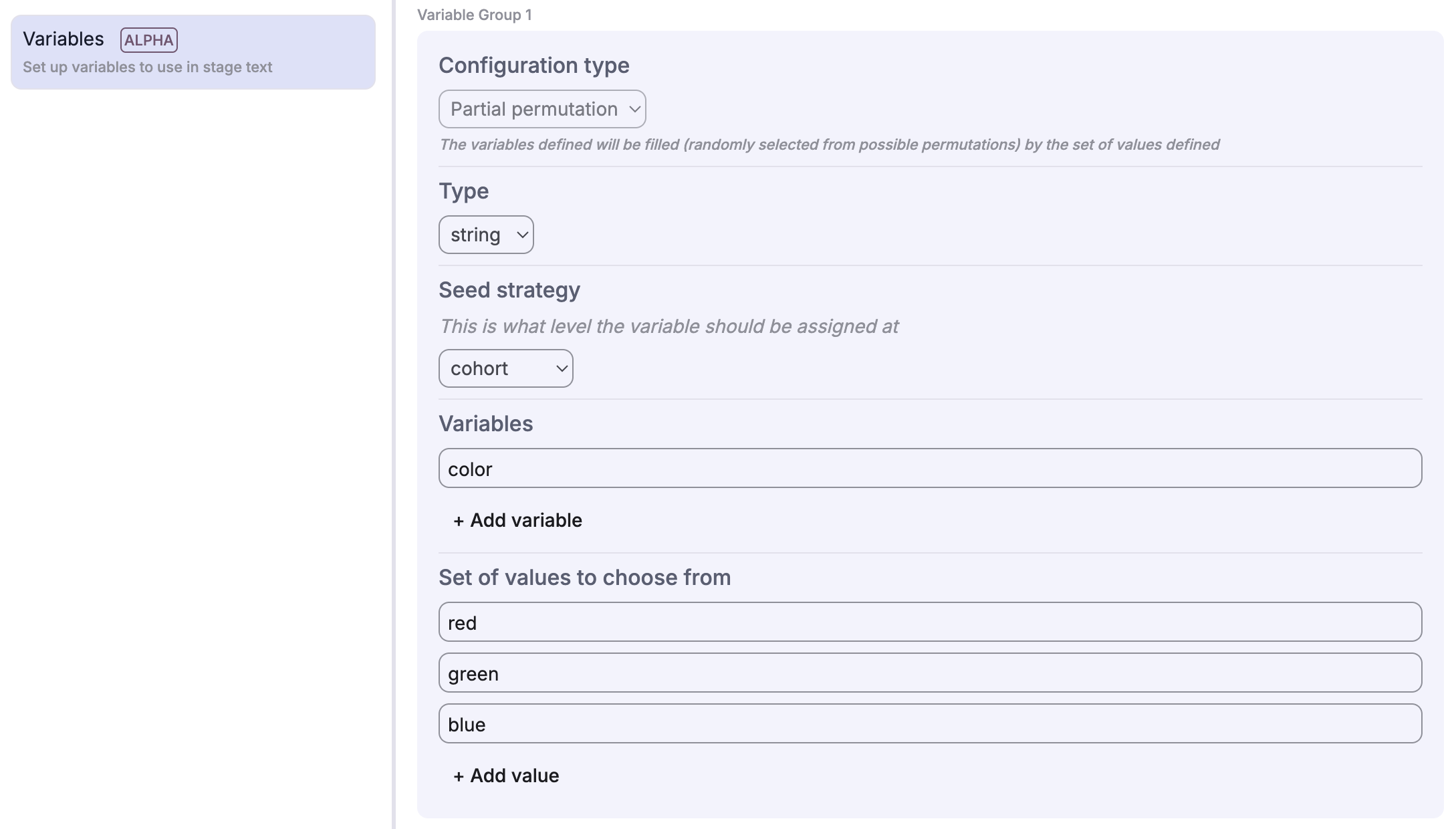
Deliberate Lab offers variable support within experiments. Variable configs can be defined in the experiment builder; experimenters can specify:
- A schema defining the variable structure (primitives, objects, or arrays)
- A scope defining when the variable is assigned:
- Experiment (Global): Value is constant for the entire experiment.
- Cohort: Value is assigned when a cohort is created (shared by all participants in that cohort).
- Participant: Value is assigned when a participant joins (unique to that participant, or independently shuffled).
- A set of variable names to be populated
- A set of values to choose from (as JSON strings)
For Random Permutation variables, values are randomly selected from the pool based on the scope (e.g., a Cohort-scoped variable is randomized once per cohort).
Support for other config types, such as populating variables based on a weight distribution of values or manually assigning values when creating a cohort, to be added eventually.
Variable Naming Rules
Variable and property names can only contain:
- Letters (a-z, A-Z)
- Numbers (0-9)
- Underscores (_)
Names cannot start with a number. This prevents conflicts with Mustache template syntax where dots (.) are used for path access (e.g., ``).
The variables use Mustache templating and are supported in the following locations:
- Stage descriptions (primary text, info text)
- Info stages (info lines)
- Multi asset allocation stages (stock name and description)
- FlipCard stages (card title, front content, back content)
- Survey stages (question title, multiple choice option text, scale labels)
- Survey per participant stages (same as Survey stages)
- Agent prompts (TEXT prompt items)
Variable Schemas
Variables use JSON Schema (via TypeBox) to define their structure. This provides runtime validation and type safety.
Primitive Types
// String variable
schema: VariableType.STRING

// Number variable
schema: VariableType.NUMBER

// Boolean variable
schema: VariableType.BOOLEAN
Object Types
For structured data with named fields:
schema: VariableType.object({
  name: VariableType.STRING,
  age: VariableType.NUMBER,
  active: VariableType.BOOLEAN,
})
Template usage: ,
Array Types
Arrays of primitives:
// Array of strings
schema: VariableType.array(VariableType.STRING)

// Array of numbers
schema: VariableType.array(VariableType.NUMBER)
Template usage: ,
Arrays of objects:
schema: VariableType.array(
  VariableType.object({
    title: VariableType.STRING,
    text: VariableType.STRING,
  })
)
Template usage: ,
Expanding Arrays to Separate Variables
For Random Permutation variables, you can choose to expand an array into individual indexed variables. This is controlled by the “Expand to separate variables” option (enabled by default).
When enabled (expandListToSeparateVariables: true):
- Creates separate variables:
charity_1,charity_2,charity_3, etc. - Each variable holds a single value from the array
- Template usage:
,
When disabled (expandListToSeparateVariables: false):
- Creates a single array variable:
charity - Template usage:
,or iteration with...
This is useful when you want predictable variable names for a fixed number of items (e.g., always showing exactly 3 charities) rather than working with array indices.
Tip: If you need to easily distinguish between items with identical display values in your analysis, use an Object variable and include an identifier field in the value itself (e.g., {id: "donors_choose", name: "Education Charity"}).
Nested Structures
Schemas can be nested arbitrarily:
schema: VariableType.object({
  policy: VariableType.STRING,
  arguments_pro: VariableType.array(
    VariableType.object({
      title: VariableType.STRING,
      text: VariableType.STRING,
    })
  ),
  arguments_con: VariableType.array(
    VariableType.object({
      title: VariableType.STRING,
      text: VariableType.STRING,
    })
  ),
})
Validation
Variables are validated at multiple points:
- In the variable editor: Values are validated against schemas as you type, with errors shown inline.
- In the experiment builder: Template references are checked for missing variables (referenced but not defined) and unused variables (defined but never referenced).
- When creating cohorts/participants: Values are validated when
generateVariablesForScope()assigns them. Validation errors are logged as warnings.
See the Implementation section for details.
Implementation
Schema Definition (utils/src/variables.ts)
Variables use TypeBox to create JSON Schema objects:
export namespace VariableType {
  export const STRING = Type.String();
  export const NUMBER = Type.Number();
  export const BOOLEAN = Type.Boolean();
  export const object = (properties: Record<string, TSchema>) =>
    Type.Object(properties);
  export const array = (items: TSchema) =>
    Type.Array(items);
}
Each VariableConfig contains:
definition: TheVariableDefinition(name, description, schema).type: The type of config (e.g.,STATIC,RANDOM_PERMUTATION).scope: The scope of assignment (EXPERIMENT,COHORT,PARTICIPANT).
Schema Validation
Validation uses TypeBox schemas with Ajv as the underlying validator. Validation occurs at these points:
-
In the variable editor (design-time): As you edit variable values, the UI validates them against the schema and shows errors inline (
validateVariableValue()invariables.utils.ts). -
When cohorts/participants are created (runtime): Values are validated when
generateVariablesForScope()assigns values. Validation errors are logged as warnings but don’t block creation (validateParsedVariableValue()invariables.utils.ts).
Note: TypeBox schemas in
variables.validation.tsare used for TypeScript type checking but not for runtime API validation of experiment saves.
Value Assignments
When experiments, cohorts, and participants are created (in functions/),
the variable configs (from the experiment config) are used to assign relevant
values to a variableMap on the respective object (Experiment, Cohort, or Participant).
The backend utility generateVariablesForScope (utils/src/variables.utils.ts)
filters the configs based on the current scope being created (e.g., only processing
COHORT scoped variables when creating a cohort). Values are then generated
(e.g., selecting a random permutation) and stored as JSON strings.
For Random Permutation variables with expandListToSeparateVariables enabled:
- Multiple variables are created:
name_1,name_2, etc. - Each variable holds a single item from the selected array
- The
numToSelectoption controls how many items are selected (validated to be within[1, values.length])
Values are type-coerced based on the schema:
string: Used directlynumber/integer: Parsed from stringboolean: Converted from ‘true’/’false’ stringsobject/array: Parsed from JSON strings
(Note that cohort and participant variable value assignment can be verified in the experiment dashboard via the displayed JSON configs.)
Template Resolution (utils/src/variables.template.ts)
When stages are rendered in the participant view (and for the reveal stage),
the stage config is passed through a StageHandler function that
runs specified fields through template resolution.
Template validation:
- Extracts all variable references from Mustache templates
- Validates each reference against the schema
- For nested paths (e.g., ``):
- Navigates through object
properties - Navigates through array
itemsschemas - Skips numeric array indices
- Validates field existence at each level
- Navigates through object
Editor validation: The experiment builder validates templates and shows warnings for:
- Missing variables (referenced in templates but not defined)
- Unused variables (defined but never referenced in any stage)
Template rendering:
- Type-coerces values based on schema type
- Uses Mustache.js for template rendering
- Supports nested object/array access with dot notation
In the base class StageHandler, the stage’s description (primary text, info
text) fields are resolved (extended classes are encouraged to extend this
functionality).
NOTE: Not all stages have been migrated to the stage manager/handler setup.
Survey Per Participant Behavior
In Survey per participant stages, where questions are asked about each participant in the cohort, variables are resolved using the answering participant’s variable values, not the target participant being rated.
For example, if you have a question “Rate this person’s contribution to “:
- The `` is resolved once based on the answering participant’s variable context
- The same resolved question is displayed for each target participant being rated
This is consistent with how variable scopes work:
- Experiment scope: Same value for everyone
- Cohort scope: Same value for everyone in the cohort
- Participant scope: Unique to the person taking the survey (the answerer)
If you need to display information specific to the target participant being rated (e.g., their name or role), use the built-in participant display features rather than experiment variables.
Agent Prompt Variable Behavior
Variables in agent prompts are resolved based on who is generating the prompt:
| Scenario | Variables Available |
|---|---|
| Participant agent | Experiment + Cohort + Their own participant variables |
| Mediator in private chat | Experiment + Cohort + Target participant’s variables |
| Mediator in group chat | Experiment + Cohort only |
For private chats, when a mediator is talking to a single participant, the mediator’s prompt will have access to that participant’s variables. This allows prompts like “Help discussion” to resolve correctly based on the participant being chatted with.
For group chats with multiple participants, mediators only have access to experiment and cohort-scoped variables since different participants may have different values for participant-scoped variables.
Roadmap / Future Work
The following areas are planned for future integration with Variables:
- Prompts: Support variable interpolation in LLM prompts (TEXT prompt items resolve ``).
- Flipcards: Support variables in flipcard content (card title, front content, back content).
- Surveys: Support variables in survey question text and choices (question title, option text, scale labels).
- Agent Mediators (Private Chat): Mediators in private chats have access to the target participant’s variables.
- Agent Mediators (Group Chat): Determine approach for handling multiple participants with different variable values.